Introduction
The Facebook engagement rate of your local pages is probably below 0.5%. That’s what we find in 90% of the franchise networks we audit.
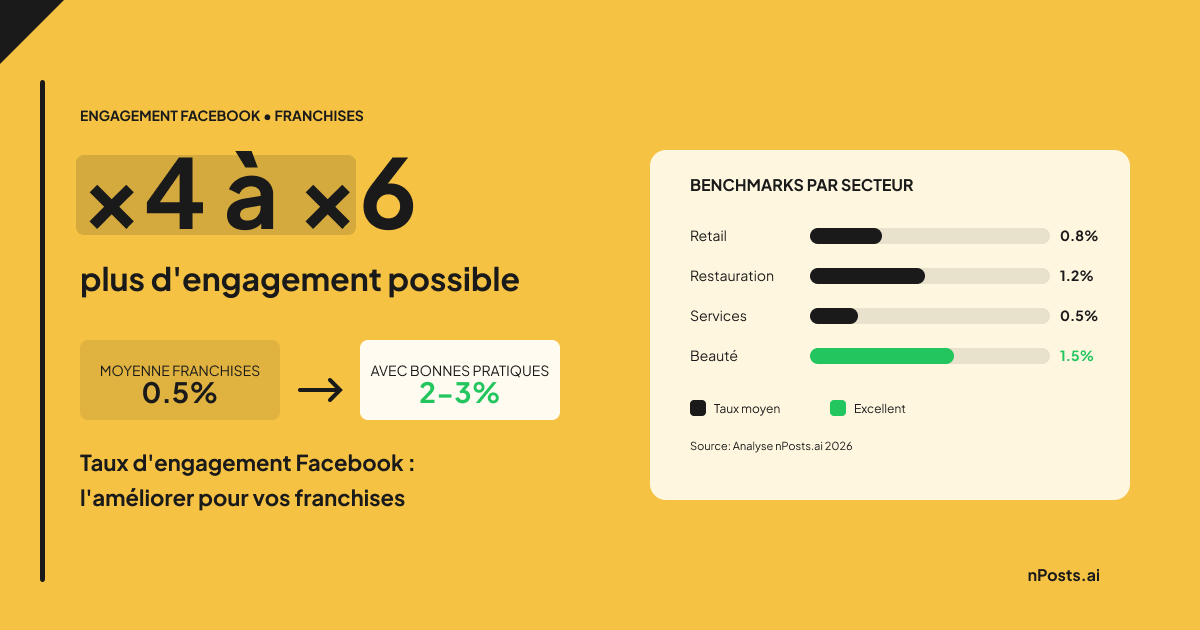
Meanwhile, well-managed local pages achieve 2 to 3% engagement. That’s 4 to 6 times more visibility, interactions, and ultimately, customers in-store.
Engagement rate isn’t just a vanity metric. It’s the main signal Facebook’s algorithm uses to decide if your content deserves to be shown. Low engagement = collapsing reach = pages becoming invisible.
This guide gives you the keys to transform your franchise pages from ghosts to engagement machines.
What Is Facebook Engagement Rate?
The Formula
Engagement rate is calculated as follows:
Engagement Rate = (Likes + Comments + Shares + Clicks) / Reach × 100
Simply put: it’s the percentage of people who interact with your content among those who saw it.
Benchmarks by Industry
| Industry | Average Rate | Good Rate | Excellent |
|---|---|---|---|
| Fashion Retail | 0.8% | 1.5% | 3%+ |
| Food & Beverage | 1.2% | 2.5% | 4%+ |
| Services (banking, insurance) | 0.5% | 1% | 2%+ |
| Beauty / Wellness | 1.5% | 3% | 5%+ |
Why the Algorithm Loves Engagement
Facebook’s algorithm works on a simple principle: show content people want to see.
How does it know? Through engagement. A post that generates interactions in the first few hours gets pushed to more people. An ignored post gets buried.
For your franchise pages, it’s a vicious or virtuous cycle:
- Low engagement → Reduced reach → Fewer people see the next post → Even lower engagement
- High engagement → Amplified reach → More people see the next post → Engagement maintained
Why Franchise Pages Have Low Engagement
1. Generic Content
Headquarters creates one post for “all pages.” Result: a message that speaks to no one in particular.
“Discover our new collection!” doesn’t generate the same engagement as “The Boulogne team presents the new collection, available tomorrow in-store!“
2. Duplicate Content
When 100 pages publish exactly the same text and image, the algorithm detects the duplicate. It chooses ONE page to favor (usually the biggest) and penalizes the other 99.
To see which tools solve duplicate content for franchise networks, read our franchise social media tools comparison.
3. Insufficient Frequency
A page that posts once a month is forgotten by the algorithm. The minimum to stay visible: 3 to 5 posts per week.
4. Lack of Interaction
Posting isn’t enough. If no one responds to comments, followers stop interacting. Why comment if you’re ignored?
5 Strategies to Boost Engagement
1. Personalize Each Post
Each page should publish a unique version of headquarters content:
| Variable | Example |
|---|---|
{{store}} | ”Martin Optics Lyon” |
{{city}} | ”Lyon” |
{{manager}} | ”Jean” |
{{address}} | ”15 Republic Street” |
A personalized post generates on average +47% engagement compared to a generic post.
2. Post at the Right Time
Optimal times vary by geographic area and industry. Generally:
- Retail: 12pm-2pm and 6pm-8pm
- Food & Beverage: 11am-12pm (before lunch) and 5pm-7pm
- Services: 9am-10am and 4pm-5pm
The classic mistake: publishing all pages at the same national time. Your local pages should post at their audience’s local times.
3. Use Formats That Engage
Not all formats are equal:
| Format | Relative Engagement |
|---|---|
| Native Video | +135% |
| Reels | +120% |
| Carousel | +80% |
| Simple Image | Reference (100%) |
| External Link | -50% |
Priority: short videos (15-60 seconds) filmed in-store.
4. Interact with the Community
Golden rule: respond to every comment within 24 hours.
Pages that systematically respond see their engagement increase by +40% on average. The algorithm rewards “active” pages.
5. Create Local Exclusive Content
Content that works best:
- The team: Photo of the manager, new employee
- Behind the scenes: Event preparation, stock reception
- Customers: Testimonials, photos (with consent)
- Local: Neighborhood event, city news
This content can’t be created by headquarters. It’s what makes your local pages unique.
Measure and Track Progress
KPIs to Track
| KPI | Frequency | Goal |
|---|---|---|
| Engagement Rate | Weekly | +0.5% per quarter |
| Average Reach | Weekly | +20% per quarter |
| Comment Response Time | Daily | < 24h |
| Posts/week | Weekly | 3-5 minimum |
Measurement Tools
- Meta Business Suite: Free, basic data
- nPosts.ai: Centralized multi-location reporting, page-to-page comparison
Realistic Goals
| Quarter | Engagement Goal |
|---|---|
| Q1 | Reach 1% |
| Q2 | Reach 1.5% |
| Q3 | Reach 2% |
| Q4 | Maintain 2%+ |
How nPosts.ai Boosts Your Pages’ Engagement
Unique Variation Generation
Each page publishes a different version of the same content. No more duplicate content, the algorithm sees 100 unique posts.
Automatic Personalization
Local variables are injected automatically. The franchisee sees their post, with their store name, ready to publish.
Optimized Timing
Staggered publishing by geographic area. Your Lyon pages publish at Lyon times, not Paris.
Centralized Reporting
Global view of the entire network’s engagement. Identify high-performing pages and those that need help.
Learn more about franchise social media management and how a dedicated platform can transform your network’s local pages.
Frequently asked questions
What is a good Facebook engagement rate for a franchise ?
A good engagement rate for a franchise Facebook page ranges from 1.5% to 3%, depending on the industry. Food and beauty brands naturally achieve higher rates than financial services. With nPosts.ai, franchise networks reach an average of 2% thanks to automatic content personalization.
How do you avoid duplicate content on franchise Facebook pages ?
Duplicate content occurs when all local pages publish the same text and image. To avoid it, each post must be unique through local variables (store name, city, manager). nPosts.ai automatically generates up to 2,916 unique combinations per post, eliminating this problem entirely.
How often should franchise local Facebook pages post ?
The recommended minimum is 3 to 5 posts per week per local page. Below that threshold, Facebook’s algorithm forgets your page and reduces its organic reach. Consistency matters more than volume: 3 steady posts per week outperform 10 posts one week followed by silence.
How can you personalize Facebook posts for each franchise location ?
Personalization involves injecting local variables into each post: store name, city, address, manager name. Manually, this becomes impossible beyond 10 locations. A tool like nPosts.ai automates this personalization, generating on average +47% more engagement compared to generic posts.
Which content formats drive the most engagement on Facebook in 2026 ?
Native videos and Reels dominate with +135% and +120% engagement respectively compared to static images. Carousels come third at +80%. External links should be avoided as they reduce engagement by 50%. Prioritize short videos of 15 to 60 seconds filmed in-store for maximum impact.
Conclusion
Your franchise pages’ Facebook engagement rate isn’t inevitable. With the right practices, you can multiply your engagement by 4 to 5.
The 3 key points:
- Personalize each post - No more copy-paste, each page publishes unique content
- Post regularly - Minimum 3-5 times per week to stay visible
- Interact - Respond to comments, create a local community
Ready to transform your franchise pages’ engagement?
Related Articles
- Social Media Franchise: The Complete Guide 2026
- How to Manage Multiple Facebook Pages for Your Franchise
- Centralize Facebook Page Management for Your Network
- Best Franchise Social Media Management Tools Compared (2026)
- Best Social Media Platforms for Franchise Brands in 2026
- Web-to-Store: Turn engagement into store traffic

![SOCi Alternatives: 5 Best Franchise Social Media Tools [2026]](/images/blog/en/social-media-tools-franchise-comparison/social-media-tools-franchise-comparison.png)