Instagram updated its dimensions in 2026. Are your visuals still the right size?
When you manage a single brand, a wrong format is a minor inconvenience. But when you’re running 50, 100, or 300 local Instagram pages, a dimension error multiplies across your entire network.
This guide gives you all the updated Instagram dimensions for 2026, with specific advice for franchises and multi-location networks. You’ll know exactly which format to use for each content type, and how to apply it at scale.
Table of Contents
- 2026 Format Summary
- Feed Post Format
- Stories Format
- Reels Format
- Carousel Format
- Multi-Location Franchise Specifics
- 2026 Format Checklist
- Resizing Tools
2026 Format Summary
Here’s the reference table with all Instagram formats for 2026:
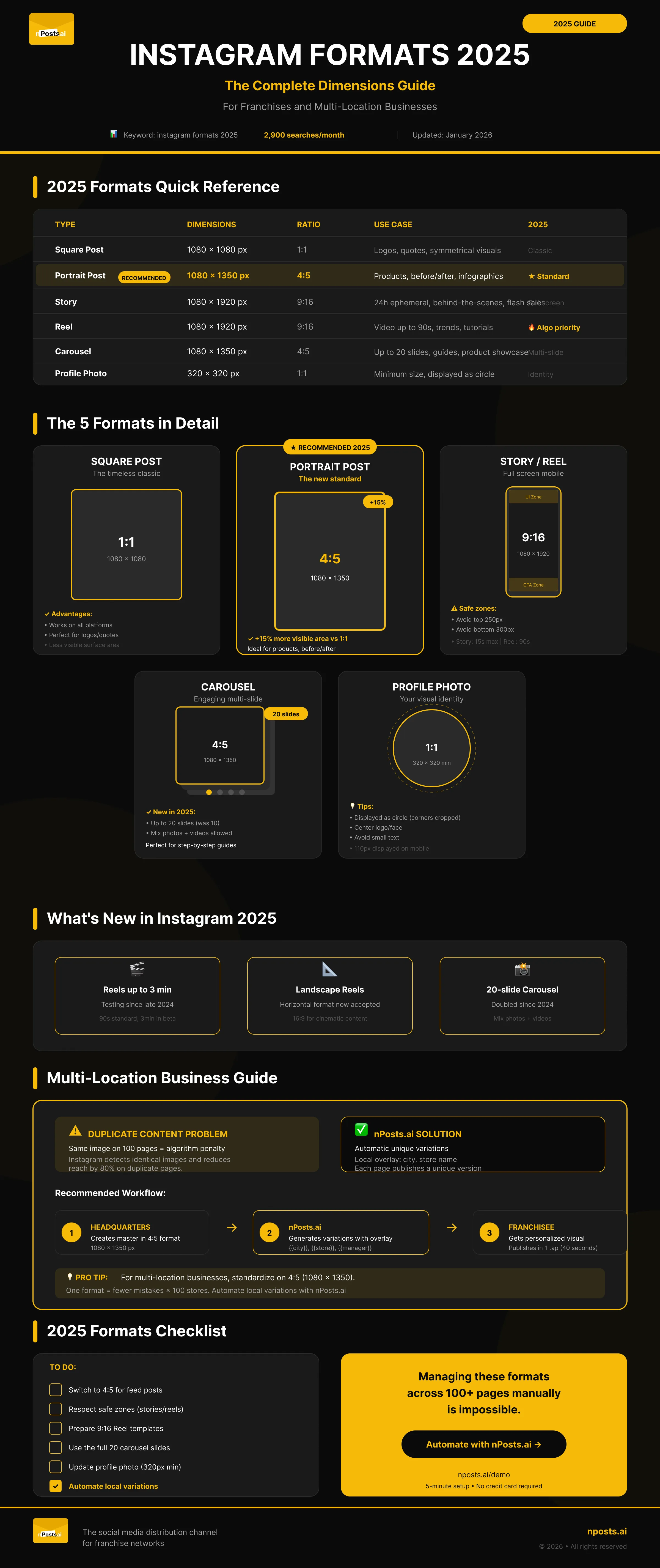
| Content Type | Dimensions (px) | Ratio | 2026 Notes |
|---|---|---|---|
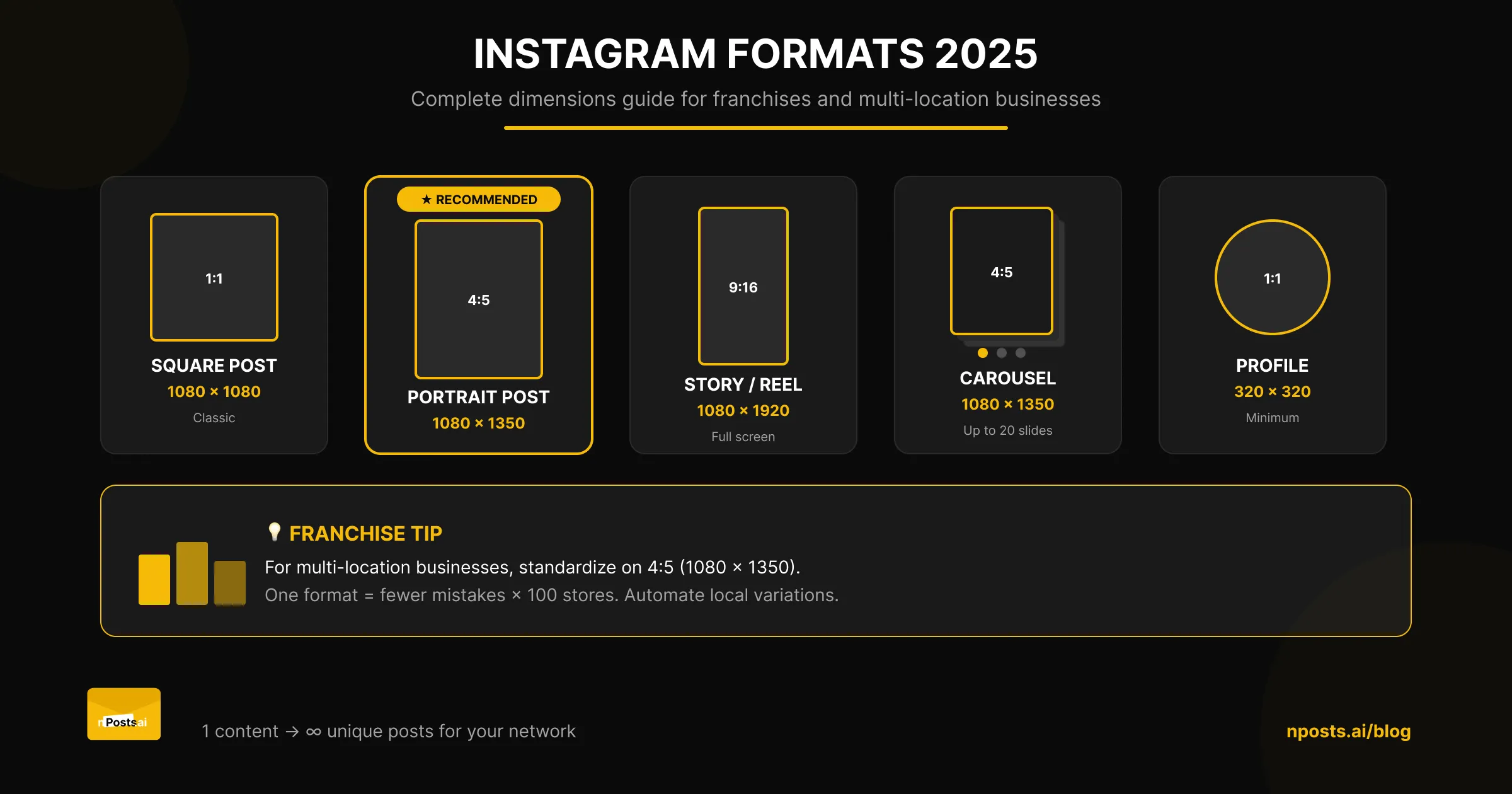
| Square post | 1080 × 1080 | 1:1 | Classic, still valid |
| Portrait post | 1080 × 1350 | 4:5 | Recommended 2026 |
| Landscape post | 1080 × 566 | 1.91:1 | Avoid |
| Story / Reel | 1080 × 1920 | 9:16 | Full screen mobile |
| Carousel | 1080 × 1080 or 1350 | 1:1 or 4:5 | Up to 20 slides |
| Profile photo | 320 × 320 | 1:1 | Minimum, displayed as circle |
| Reel thumbnail | 1080 × 1920 | 9:16 | Safe zone in center |
Keep this table handy. It summarizes everything you need to know to post in the right format.
Feed Post Format 2026
The Instagram feed remains the core of your platform presence. Here are the three available formats and when to use them.
Portrait 4:5 (1080 × 1350) — The New Standard
Portrait format is the recommended format in 2026. Why? Because it offers +15% more visible surface compared to square format.
Instagram pushes this format because it takes up more space in the mobile feed, capturing more user attention.
Ideal for:
- Product photos
- Before/after visuals
- Vertical infographics
- Quotes with visual backgrounds
Square 1:1 (1080 × 1080) — Still Relevant
Square format remains a timeless classic. It works perfectly for:
- Logos and brand identity
- Minimalist quotes
- Symmetrical visuals
- Cross-platform content (compatible with Facebook, LinkedIn)
Its advantage: it displays correctly on all social platforms.
Landscape 1.91:1 — Avoid
Avoid landscape format on Instagram. The platform crops the sides in the mobile feed, making your visuals less impactful.
Reserve this format only for horizontal videos that absolutely require this ratio.
Franchise tip: For a multi-location network, standardize on 4:5 format (1080 × 1350). Your franchisees will only have one format to master, and your visuals will have maximum impact.
Stories Format 2026
Stories remain an essential channel for daily engagement.
Dimensions: 1080 × 1920 pixels (9:16 ratio)
Duration: 15 seconds maximum per story (60 seconds being tested on some accounts)
Safe Zone to Respect
Be careful with Instagram interface zones that overlay your content:
┌─────────────────────────┐
│   [!] UI ZONE (250px)    │ ← Username, time
│                         │
│                         │
│   [OK] SAFE ZONE        │ ← Main content
│                         │
│                         │
│   [!] CTA ZONE (300px)   │ ← Buttons, links
└─────────────────────────┘
- Top: Avoid the first 250 pixels (username, time)
- Bottom: Avoid the last 300 pixels (CTA buttons, replies)
Stories Updates 2026
- 60-second stories in progressive rollout
- New interactive stickers
- Better link integration for all accounts
Reels Format 2026
Reels are the format most pushed by the algorithm in 2026. Impossible to ignore in your strategy.
Dimensions: 1080 × 1920 pixels (9:16 ratio)
Duration: Up to 90 seconds (3 minutes being tested)
Cover/Thumbnail: Same 9:16 ratio, with safe zone in center
Reels Updates 2026
- Landscape Reels: New horizontal format available
- Native templates: Ready-to-use templates in the app
- Photo Reels: Carousels transformed into Reel format
- Extended duration: 3-minute tests on some accounts
Franchise tip: Reels generate the best organic reach. Prepare video templates that your franchisees can customize locally (add city, local offer, etc.).
Carousel Format 2026
Carousels remain a high-performing format for engagement.
Number of slides: Up to 20 slides (increased from 10 in 2024)
Recommended format: 1080 × 1350 (4:5) for each slide
Mix allowed: Photos and videos in the same carousel
Use Cases for Franchises
- Product showcase: Complete range in one post
- Before/after: Service results
- Tutorials: Visual step-by-step guides
- Testimonials: Local customer reviews
- Local offers: Location-specific promotions
Carousels are perfect for telling a story or presenting multiple elements without cluttering the feed.
Multi-Location Franchise Specifics
The Visual Duplicate Content Problem
When you post the same visual across 100 Instagram pages, you send a negative signal to the algorithm. Instagram detects duplicate content and reduces the reach of each post.
Consequence: Your local pages lose visibility despite your creative efforts.
How nPosts.ai Solves This
Our platform enables you to:
- Upload a master visual at headquarters (in the right 4:5 format)
- Generate automatic variations with local overlay (city, store name)
- Distribute a unique version to each page in the network
Each franchisee thus publishes personalized content, avoiding the duplicate penalty.
Recommended Workflow
Headquarters: Creates master in 4:5 format (1080 × 1350)
    ↓
nPosts.ai: Generates variations with {{city}}, {{store}}
    ↓
Franchisee: Receives personalized visual, publishes in 1 tap
This process guarantees brand consistency AND local uniqueness.
Learn more: Complete Social Media Franchise Guide
2026 Format Checklist
Before publishing, check these points:
- Feed posts: Switch to 4:5 format (1080 × 1350)
- Stories: Respect safe zones (250px top, 300px bottom)
- Reels: Prepare customizable 9:16 templates
- Carousels: Up to 20 slides, same ratio on all
- Profile: Photo minimum 320 × 320, displayed as circle
- Franchise: Automate local variations to avoid duplicates
Resizing Tools
Free Tools
- Canva: Built-in Instagram 2026 templates, easy to use
- Adobe Express: Smart resizing
- Kapwing: Ideal for videos and Reels
For Franchises and Networks
- nPosts.ai: Automatically resizes + generates local variations for each location
The difference? Free tools work for one page. nPosts.ai manages hundreds of pages simultaneously.
Frequently asked questions
What is the best Instagram post format in 2026 ?
The portrait 4:5 format (1080 x 1350 pixels) is the recommended format for 2026. It provides 15% more visible area than square posts, and Instagram actively favors it in the mobile feed. It is also the easiest format to standardize across a franchise network using nPosts.ai.
How many slides can an Instagram carousel have ?
Since 2024, Instagram allows up to 20 slides in a single carousel, doubled from the previous limit of 10. You can mix photos and videos in the same carousel. The recommended size for each slide is 4:5 (1080 x 1350).
How do franchises avoid the Instagram duplicate content penalty ?
Posting the same visual across dozens of local pages triggers Instagram’s duplicate content detection, which reduces reach for every post. The solution is to generate unique variations for each location with local overlays (city name, store name). nPosts.ai automates this process at network scale.
Do Instagram Reels get more reach than regular feed posts ?
Yes, Reels are the format most favored by the Instagram algorithm in 2026. They generate significantly higher organic reach than static posts. For franchises, it is recommended to prepare 9:16 video templates (1080 x 1920) that franchisees can customize locally with their city or current offers.
How can a franchise post to multiple Instagram pages at once ?
Manually posting to dozens or hundreds of local pages is not practical. Tools like nPosts.ai let you create a master visual at headquarters, automatically generate localized variations, and distribute content across all network pages in a single click.
Conclusion
In 2026, remember these two key formats:
- 4:5 (1080 × 1350) for feed posts
- 9:16 (1080 × 1920) for stories and reels
For a single brand, these dimensions are enough. For a franchise or multi-location network, the challenge is different: how do you apply these formats across 50, 100, or 300 local pages without spending hours on it?
That’s exactly what nPosts.ai automates. Create a visual in the right format, and each location receives its personalized version. If you need a multi-page publishing solution for franchises that handles Instagram, Facebook, and Google Business Profile in one place, nPosts.ai was built for exactly that.
Related Articles
- Social Media Franchise: The Complete 2026 Guide
- How to Manage Multiple Franchise Facebook Pages
- Franchise Social Media Tools Comparison
About nPosts.ai
nPosts.ai is the social media management platform designed for franchises and multi-location networks. Post everywhere, in a single tap. Learn more